
10 Password Best Practices In today’s digital age, technology is an integral part of any business. While it offers numerous advantages, it also brings challenges, particularly in cybersecurity. One of the most fundamental aspects of cybersecurity is password protection. This involves setting passwords to secure data, ensuring that only those with the correct passwords can access the information. However, the frequent use of passwords often leads to complacency and careless mistakes, which can result in security breaches. Therefore, businesses must educate their employees on best practices for using passwords. 5 Password “Don’ts” To protect the confidentiality of your passwords, avoid these five common mistakes: Don’t write passwords on sticky notes. While it might seem like a good way to remember your passwords, it makes them vulnerable to local theft. Don’t save passwords to your browser. Browsers are not secure for storing sensitive information, as they can be easily compromised by malware and other threats. Don’t iterate your password (e.g., PowerWalker1 to PowerWalker2). This practice is ineffective against sophisticated cyber threats, as hackers can easily crack iterated passwords. Don’t capitalize the first letter of your password to meet the “one capitalized letter” requirement. Hackers are aware of this common habit, making it easy for them to guess the capitalized letter’s position. Don’t use “!” to meet the symbol requirement. If you must use it, avoid placing it at the end of your password. Instead, place it elsewhere in the sequence to enhance security. 5 Password “Do’s” To ensure the confidentiality of your passwords, follow these five best practices: Create long, phrase-based passwords that substitute letters with numbers and symbols. For example, “Honey, I shrunk the kids” can be written as “h0ney1$hrunkth3k!d$,” making it harder for hackers to crack. Use multifactor authentication. Adding multiple layers of authentication is one of the best ways to keep cybercriminals at bay. Always use passwords longer than eight characters that include numbers, letters, and symbols. The more complex the password, the better. Use a different password for every account. Reusing passwords across multiple accounts gives cybercriminals a golden opportunity to exploit all your accounts. Use a password manager. This tool can help you remember a long list of passwords, freeing up your time for more productive tasks. Adhering to password best practices requires ongoing attention and effort. Working with a managed service provider (MSP) such as Northern Star can help improve security. Northern Star has more than 20 years of IT experience in educating businesses and employees about best IT security practices for protecting against cyber theft of company data. We offer various IT security solutions and can be customized for different business needs. For further information or to arrange a consultation, please call 0800 319 6032 or email sales@northernstar.co.uk.

Windows 10 End of Life: What You Need to Know
Windows 10, released in 2015, has been a reliable operating system for nearly a decade. However, Microsoft will end support for Windows 10 on October 14, 2025, bringing important changes for users. End of life means Microsoft will stop providing updates, security patches, and technical support for Windows 10. Devices will still run, but without protection from new vulnerabilities. Microsoft regularly phases out older systems to focus on newer technology, like Windows 11, offering improved security and performance. As Windows 10 approaches its end-of-life, many organisations are faced with important decisions regarding their IT infrastructure. Northern Star has successfully assisted numerous businesses in transitioning smoothly to Windows 11, drawing on a wealth of IT security expertise accumulated over nearly two decades. The conclusion of Windows 10 support means that continuing to use this operating system will increasingly expose your systems to security threats and operational risks. Cybercriminals often target unsupported platforms, as unpatched vulnerabilities can leave networks wide open to exploitation. With this in mind, it is crucial to develop a comprehensive plan to upgrade or replace any devices still running Windows 10 well before support officially ends. To ensure your business remains protected, consider conducting a full assessment of your current devices and determining which ones can be upgraded to Windows 11 and which will require replacement. Early planning allows ample time for testing, user training, and seamless migration of critical data and applications, minimising disruption to your daily operations. Upgrading before the October 14, 2025, deadline will help safeguard your business against emerging digital threats and ensure business continuity. If you require guidance or support in navigating this transition, Northern Star is ready to provide expert advice and tailor solutions to your unique needs. Don’t wait until the last moment—secure your network, maintain compliance, and future-proof your IT systems. For further information or to arrange a consultation, please contact us at 0800 319 6032 or sales@northernstar.co.uk.
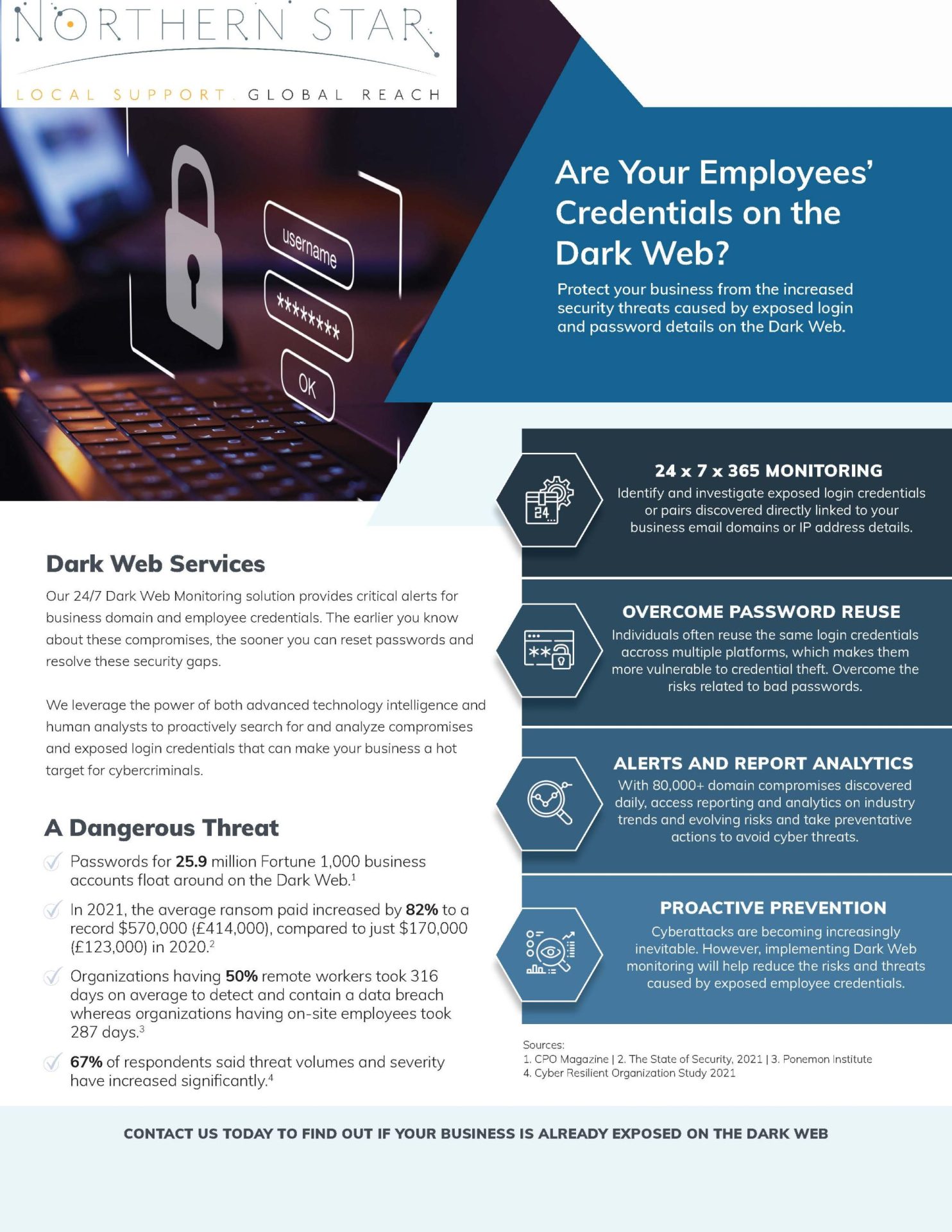
Employee Credentials on the Dark Web: A Serious Business Threat-Safeguard Your Organisation Now!
Employee credentials are one of the easiest ways for cyber criminals to get inside a business. A username and password may seem like a small detail, but if those details are exposed, they can give an attacker a route into your email, cloud files, finance systems, client data and internal conversations. This is why employee credentials on the dark web should never be ignored. If your staff logins are being shared, sold or tested by criminals, your organisation may already be at risk before anyone notices anything unusual. With the right monitoring, user awareness, account protection and ongoing IT support and management, you can identify risks earlier and take practical steps before exposed credentials become a serious business incident. Why employee credentials end up on the dark web Employee credentials can be exposed in several ways. A member of staff may click a phishing link and enter their password into a fake login page. Malware may steal saved passwords from a laptop or browser. Details may also be leaked through a third-party website or service that has suffered a data breach. The risk becomes much greater when employees reuse passwords across work and personal accounts. A password leaked from a personal website may later be tested against Microsoft 365, remote access tools, accounting software or other business systems. This is known as credential stuffing, and it is one reason password reuse is so dangerous. Your business does not need to suffer a direct breach for your credentials to appear online. That is what makes dark web monitoring so valuable. It can help identify exposed business email addresses, compromised passwords and company-related data that may already be circulating in places linked to cybercrime. Why this is a serious business threat If an attacker has valid login details, they may not need to break through your systems. They may simply sign in. From there, they could read emails, access files, reset passwords, impersonate employees, redirect payments or send convincing phishing messages from a genuine business account. If the account belongs to a senior employee or administrator, the risk can be even more serious because that account may have wider access. Compromised credentials can lead to: Unauthorised access to business systems Fraudulent emails sent from real company accounts Invoice fraud and payment redirection Data loss or data theft Ransomware risk Loss of client confidence Regulatory and legal concerns For small and medium-sized businesses, the impact can be particularly difficult. You may not have a large internal cyber security team, but criminals still see your data, accounts and systems as valuable. Practical security services should therefore be part of your wider IT plan, not something you only consider after an incident. Phishing remains one of the biggest risks Phishing continues to be one of the most common ways attackers target UK organisations. Fraudulent emails, fake login pages and convincing messages can trick employees into giving away their details without realising it. This is why your people need to know what suspicious messages look like. They should be encouraged to question unexpected links, urgent requests, password expiry warnings and login prompts that do not feel right. A structured anti phishing approach can help your team recognise common tactics and report concerns quickly. This should not be about blaming employees. It should be about helping them become a stronger part of your defence. Strengthen your Microsoft 365 and cloud accounts Many businesses rely on Microsoft 365 for email, file storage, calendars, collaboration and day-to-day communication. That makes cloud accounts a major target for credential-based attacks. Your cloud services and Office 365 setup should be reviewed regularly. Multi-factor authentication should be enabled where possible, old accounts should be removed, permissions should be appropriate and unusual sign-in activity should be investigated. Admin accounts need extra care. If an attacker gains access to an administrator account, they may be able to make wider changes across your environment. Admin rights should only be given to people who genuinely need them, and those accounts should have stronger protection than standard user accounts. Use multi-factor authentication wherever possible Multi-factor authentication adds an extra step when someone signs in. This means that even if a password is exposed, an attacker may still be blocked from accessing the account. It is especially important for email, cloud platforms, finance systems, remote access tools and administrator accounts. While no single control removes all risk, multi-factor authentication is one of the most practical ways to reduce the damage caused by leaked passwords. You should also review how authentication is managed across your business. If some systems have strong protection but others do not, attackers may target the weakest entry point. Protect every device your staff use Credentials are often stolen from devices, not just websites. If a laptop, desktop or mobile device is infected with malware, saved passwords, browser sessions and business data may be at risk. Every work device should be updated, protected and monitored. Staff should avoid saving passwords in unsafe places, and personal devices should not be used for sensitive business work unless they are properly managed. Reliable hardware and software support can help keep your devices secure, maintained and suitable for the way your team works. It can also make it easier to respond quickly if a device is suspected of being compromised. Review your wider security position Credential exposure can be a sign of wider security weaknesses. Old software, weak passwords, poor access controls, unprotected devices and exposed remote access services can all increase the chance of an account being misused. Regular technical reviews can help you find these weaknesses before attackers do. Network penetration testing can help identify vulnerabilities across your IT environment, while broader penetration testing can show how your systems may stand up against real-world attack methods. The aim is not to create fear. It is to give you useful information, clear priorities and practical actions that reduce risk. Plan properly when systems change Credential risk can increase during periods of change. If you are moving platforms, introducing new cloud tools, merging systems or changing providers, old accounts and weak access controls can

A Day in the Life of an IT Support Engineer
In the rapidly evolving landscape of technology, IT support engineers play a crucial role in ensuring the seamless operation of systems and services. Their daily responsibilities encompass the troubleshooting of technical issues, the provision of guidance on software and hardware, and the maintenance of a stable digital environment. The following overview illustrates the typical duties and activities of an IT support engineer throughout the day. Morning: Setting the Stage The day commences early for an IT support engineer, who begins by reviewing emails and assessing any support tickets that have been submitted overnight. This initial phase is essential for prioritising tasks and strategically planning the day. Following this, a concise team meeting often takes place, during which engineers discuss ongoing technical challenges, share valuable insights, and assign responsibilities to optimise the workflow. Mid-Morning: Addressing Technical Challenges With a strategic plan established, IT support engineers engage in troubleshooting a variety of technical issues. These challenges may involve resolving network connectivity problems or addressing software malfunctions. Each issue presents its complexities, necessitating a combination of technical expertise and analytical skills. Engineers frequently utilise remote access tools to diagnose and resolve problems efficiently, often without requiring physical presence at the user’s location. Lunchtime: A Moment for Rejuvenation The lunchtime period offers a vital opportunity for a brief respite from the continuous stream of technical challenges. This time allows engineers to recharge, interact with colleagues, and perhaps exchange light-hearted conversations related to technology. However, this intermission is typically short-lived, as the afternoon presents its own set of challenges that require immediate attention. Afternoon: User Support and Training The afternoon is primarily dedicated to user support and the facilitation of training sessions. IT support engineers provide assistance to employees experiencing technical difficulties, which may include the setup of new hardware or instructions on specific software applications. These training sessions are instrumental in equipping users with best practices and familiarising them with emerging technologies. Late Afternoon: Documentation and Reporting As the workday concludes, IT support engineers focus on comprehensive documentation and reporting. It is imperative to maintain detailed records of issues and their resolutions for future reference and continuous improvement. Additionally, engineers prepare reports summarising the day’s activities, highlighting recurring challenges and recommending potential solutions. Evening: Concluding the Day Before finishing their duties for the day, IT support engineers systematically review any outstanding support tickets to ensure that critical issues have been addressed appropriately. They may also allocate time for researching new technologies and remaining informed about industry trends. Continuous professional development is not merely an asset but a fundamental aspect of the role, given the ever-evolving nature of the technology sector. Northern Star has a small, globally distributed team of engineers dedicated to providing our clients with exceptional technical support and guidance in all aspects of IT. One advantage of having a smaller team is the personal approach we can offer. Clients will work with the same group of engineers consistently, fostering trust and building strong working relationships. There’s nothing more frustrating than logging a ticket with your IT helpdesk and having it passed around among multiple engineers without clear ownership of the issue. That’s why we ensure you work with the same dedicated engineer throughout the entire process of resolving your IT query. Should the need arise to escalate your issue to our second or third-line support teams, you will still have a single point of contact. Our engineers boast a wealth of expertise, each with a minimum of five years of IT experience, so you can trust that you are in highly capable hands. Unlock the power of our professional and cost-effective IT solutions, expertly crafted to meet your specific needs and size. Don’t wait—contact us today on 0800319 6032 or email us at sales@northernstar.co.uk to elevate your IT experience!

Why Your Business Should Become Cyber Essentials Accredited
Cyber Essentials is a UK government-backed scheme designed to help organisations protect themselves against common online threats. Launched in 2014, it provides businesses with a set of security standards and guidelines to follow, ensuring they implement basic cyber hygiene practices. The scheme offers two levels of certification: Cyber Essentials and Cyber Essentials Plus. While the basic Cyber Essentials certification involves a self-assessment process, Cyber Essentials Plus requires independent verification and testing of the organisation’s cybersecurity measures. The Cyber Essentials certification focuses on five key technical controls: Boundary Firewalls and Internet Gateways: Configuring firewalls and gateways to protect your network from unauthorised access. Secure Configuration: Ensuring that systems are configured securely to reduce vulnerabilities. Access Control: Implementing measures to control access to data and services, ensuring that only authorised personnel have access. Malware Protection: Installing and regularly updating anti-malware software to protect against malicious software. Patch Management: Keeping software and systems up to date with the latest patches to mitigate security risks. Cyber Essentials Plus builds upon the basic certification by requiring a hands-on technical assessment. This includes internal and external vulnerability scans, as well as a thorough review of your organisation’s cybersecurity processes. Achieving Cyber Essentials Plus demonstrates a higher level of commitment to cybersecurity and provides additional assurance to clients and partners. Becoming Cyber Essentials accredited offers numerous advantages for businesses of all sizes and sectors. Here are some key benefits: By adhering to the Cyber Essentials guidelines, your business can significantly reduce the risk of cyber attacks. Implementing these basic security measures helps protect against common threats such as phishing, malware, and ransomware. Achieving Cyber Essentials accreditation signals to clients, partners, and stakeholders that your business is committed to cybersecurity. This can enhance your reputation and build trust, potentially leading to increased business opportunities. Many industries are subject to regulatory requirements related to data protection and cybersecurity. Cyber Essentials accreditation can help your business demonstrate compliance with these regulations, avoiding potential fines and penalties. In an increasingly competitive market, Cyber Essentials accreditation can set your business apart from competitors. It showcases your dedication to cybersecurity, giving you an edge when bidding for contracts or attracting new customers. Some insurance providers offer discounts or favourable terms to businesses that are Cyber Essentials accredited. This reflects the reduced risk associated with robust cybersecurity measures. Steps to Achieve Cyber Essentials Accreditation Achieving Cyber Essentials accreditation involves several steps, but the process is straightforward and can be completed relatively quickly. Here is a step-by-step guide to help your business become accredited: Familiarise yourself with the Cyber Essentials guidelines and technical controls. Ensure that your business meets the criteria for certification. For the basic Cyber Essentials certification, complete the self-assessment questionnaire. This involves evaluating your current cybersecurity measures and identifying areas for improvement. Based on your self-assessment, make any necessary changes to your cybersecurity practices. This may involve configuring firewalls, updating software, or enhancing access controls. Once you have implemented the required changes, submit your self-assessment questionnaire to a certification body. They will review your submission and issue the Cyber Essentials certificate if you meet the criteria. Pursue Cyber Essentials Plus If you opt for Cyber Essentials Plus, arrange for an independent technical assessment. A certified assessor will conduct vulnerability scans and review your cybersecurity processes. Upon successful completion, you will receive the Cyber Essentials Plus certificate. Northern Star is a trusted partner for businesses preparing their infrastructure for Cyber Essentials Accreditation. We excel in guiding companies through both the foundational Cyber Essentials certification and the more comprehensive Cyber Essentials Plus, which is rapidly becoming the gold standard for SME’S. If you would like to discuss this with one of our IT security specialists, contact us today on 0800 319 6032 or email us at sales@northernstar.co.uk

What is an Office 365 Assessment
An Office 365 assessment is a structured review of how your business uses Microsoft 365, which many people still call Office 365. It looks at your users, licences, security settings, email setup, file storage, collaboration tools and overall configuration. The aim is simple. It helps you understand what is working well, what could be improved, where money may be wasted and where your business could be exposed to unnecessary risk. For many businesses, Microsoft 365 grows quietly in the background. New users are added, licences are changed, Teams channels are created, SharePoint sites are built and files are shared internally and externally. Over time, your setup can become harder to manage. That is why an assessment is useful. It gives you a clearer picture of your current environment and helps you make better decisions about security, cost, productivity and ongoing IT support and management. Why does an Office 365 assessment matter? Microsoft 365 often sits at the centre of your business. It holds emails, files, calendars, Teams conversations, shared documents and sensitive company information. If it is not reviewed properly, small issues can turn into costly problems. A good Office 365 assessment can help you: Identify security gaps before they become serious Review whether users have the right level of access Reduce unused or unsuitable licence costs Improve email protection and account security Check SharePoint, OneDrive and Teams permissions Support compliance and data protection Plan improvements in a clear and practical way Cyber security is a major reason to take this seriously. The UK Government’s Cyber Security Breaches Survey 2025/2026 found that 43% of UK businesses identified a cyber breach or attack in the previous 12 months. Phishing remained the most common type of breach or attack, affecting 38% of businesses. That matters because many phishing attacks are designed to steal Microsoft 365 login details. Once an attacker has access to one account, they may be able to read emails, reset passwords, access files or send convincing messages to your clients and suppliers. What does an Office 365 assessment usually include? An Office 365 assessment should be more than a quick look at your admin portal. It should be a proper review of the areas that affect your day-to-day operations, security and costs. A typical assessment may include: User account review Licence usage analysis Mailbox and email security checks Multi-factor authentication review SharePoint and OneDrive permissions review Teams’ configuration review Device access checks Conditional access review Backup and recovery considerations Retention and compliance settings This can sit naturally alongside wider cloud services and Office 365 support, especially if you want recommendations to be turned into practical improvements. Security: finding the gaps before attackers do Many businesses assume Microsoft 365 is secure by default. Microsoft provides strong tools, but those tools still need to be configured correctly for your business. An assessment may check whether multi-factor authentication is in place, whether admin accounts are properly protected, whether legacy authentication has been restricted and whether risky sign-ins are being monitored. It may also review email authentication settings such as SPF, DKIM and DMARC. These can help reduce spoofing and impersonation, where attackers try to send emails that appear to come from your business. This is closely linked to anti phishing support, because email remains one of the easiest ways for attackers to reach your team. The latest government survey also found that phishing was considered the most disruptive breach or attack by 69% of businesses and charities that experienced a breach or attack. If you are already worried about suspicious emails, account compromise or unusual login activity, an assessment can help you understand whether your setup is giving users enough protection. Licences: are you paying for what you actually use? Microsoft 365 licensing can become messy over time. You may have inactive users still assigned to paid licences, staff on plans they do not need or teams using features that could be managed more efficiently. An Office 365 assessment can help you review: Which licences are assigned Which users are inactive Which features are actually being used Whether some plans are unsuitable Whether costs could be reduced safely This can have a direct financial impact. For example, if you are paying £20 per user per month for 10 unused or unsuitable licences, that could cost your business £2,400 a year without adding value. The goal is not simply to cut costs. It is to make sure your Microsoft 365 setup matches how your team works. Permissions: who can access what? Permissions are one of the most important parts of an Office 365 assessment. Staff move roles, people leave the business, external users are invited into documents and old sharing links are often forgotten. An assessment should help you understand who has access to key files, folders, mailboxes, Teams channels and SharePoint sites. It should help answer questions such as: Do former staff still have access? Are external users still connected to files? Are sensitive folders open to too many people? Are admin rights limited to the right users? Are sharing settings too relaxed? This is especially important for businesses that handle financial records, contracts, client data, HR files or confidential commercial information. If wider protection is needed, security services can help strengthen your environment across users, devices and systems. Email protection and account compromise Email is often the main target in a Microsoft 365 environment. A single compromised mailbox can create serious problems, especially if attackers use it to send fake invoices, intercept payment conversations or target your contacts. An Office 365 assessment may review spam filtering, mailbox forwarding rules, safe links, safe attachments and suspicious sign-in activity. It can also check whether users have risky settings that could make account compromise harder to spot. If stolen credentials are a concern, dark web monitoring may also help. This can identify whether business email addresses, passwords or other company-related details have appeared in exposed data sources. For businesses that want a deeper view of technical risk, network penetration testing can help uncover

Why Businesses Should Consider Using Microsoft Intune
In today’s fast-paced digital world, businesses are constantly seeking ways to enhance their productivity, security, and overall efficiency. One powerful tool that can help achieve these goals is Microsoft Intune. Intune is a cloud-based service that provides unified endpoint management for both corporate and personal devices. Here are several compelling reasons why businesses should consider integrating Intune into their operations Unified Endpoint Management Microsoft Intune allows businesses to manage all their devices, including Windows, iOS, Android, and macOS, from a single platform. This unified approach simplifies device management and ensures that all devices are compliant with company policies . Enhanced Security Security is a top priority for any business. Intune offers robust security features such as compliance policies, device encryption, and conditional access. These features help protect sensitive data and ensure that only authorised users can access company resources . Simplified Device Enrollment Intune supports automatic and bulk enrollment, making it easy for businesses to get devices up and running quickly. This streamlined process reduces the time and effort required to manage devices, allowing IT teams to focus on more strategic tasks. Application Management With Intune, businesses can manage and deploy applications across all their devices. This ensures that employees have access to the tools they need to perform their jobs effectively. Additionally, Intune allows for the distribution of custom apps, providing businesses with the flexibility to meet their unique needs . Compliance and Reporting Intune provides detailed compliance reports and security summaries, helping businesses stay on top of their security posture. These reports offer valuable insights into device compliance and potential security risks, enabling proactive management . Remote Actions Intune enables businesses to perform remote actions such as wiping, locking, or restarting devices. This is particularly useful for managing lost or stolen devices, ensuring that sensitive data remains protected . Integration with Microsoft 365 Intune integrates seamlessly with other Microsoft 365 services, providing a cohesive experience for managing users and devices. This integration enhances productivity and collaboration, making it easier for businesses to manage their digital ecosystem . Support for BYOD Bring Your Own Device (BYOD) policies are becoming increasingly popular in the modern workplace. Intune supports BYOD, allowing employees to use their personal devices while ensuring that company data remains secure. This flexibility can improve employee satisfaction and productivity. Scalability As a cloud-based service, Intune can scale to meet the needs of businesses of all sizes, from small startups to large enterprises. This scalability ensures that businesses can grow and adapt without worrying about outgrowing their device management solution . Cost-Effective By reducing the need for on-premises infrastructure and simplifying device management, Intune can help lower IT costs. This cost-effective solution allows businesses to allocate resources more efficiently and invest in other areas of growth .

London SMB’s-End of Windows 10 Support is Fast Approaching- You need to Act Now!
As the end of support for Windows 10 approaches, small and medium-sized businesses (SMBs) must begin to prepare for this significant change. Microsoft has announced that the official end of support date for Windows 10 is set for October 14, 2025. This deadline marks the end of updates, security patches, and technical support for the operating system that many businesses have relied upon for years. Understanding the Impact When Microsoft ceases support for Windows 10, any devices running this operating system will no longer receive crucial security updates. This lack of updates can expose your business to vulnerabilities, making it an easy target for cyberattacks. Additionally, without technical support, resolving any issues that arise with Windows 10 will become increasingly difficult, potentially disrupting your business operations. Security Risks One of the most significant risks of continuing to use an unsupported operating system is the increased likelihood of security breaches. Cybercriminals are always looking for unpatched systems to exploit, and without regular security updates, Windows 10 devices become prime targets. For SMBs, a cyberattack can be devastating, leading to data loss, financial damage, and a loss of customer trust. Operational Challenges Beyond security concerns, businesses may experience operational challenges as software vendors gradually stop supporting Windows 10. New applications and software updates may not be compatible with the outdated operating system, hindering your ability to use the latest tools and technologies. This incompatibility can slow down productivity and limit your business’s growth opportunities. Evaluating Your Options To mitigate the risks associated with the end of Windows 10 support, SMBs should proactively evaluate their options and plan for the transition to a supported operating system, such as Windows 11. Upgrade to Windows 11 Windows 11 is the latest operating system from Microsoft, designed to offer enhanced security, performance, and productivity features. Upgrading to Windows 11 ensures your business continues to receive critical updates and support. Before making the switch, assess your current hardware to determine if it meets the system requirements for Windows 11. If necessary, budget for hardware upgrades to ensure compatibility. Alternative Operating Systems While upgrading to Windows 11 is a straightforward solution, some SMBs may consider alternative operating systems. Linux, for example, is an open-source platform known for its stability and security. Switching to Linux can be cost-effective and offer a high degree of customization, though it may require additional training for your team. Cloud-Based Solutions Another viable option is to transition to cloud-based solutions. Utilizing Software-as-a-Service (SaaS) platforms can reduce your dependency on a specific operating system, as these solutions are accessible via web browsers. Cloud-based solutions also offer flexibility, scalability, and enhanced security, making them an attractive choice for SMBs looking to future-proof their operations. Creating a Transition Plan Once you’ve determined the best path forward for your business, it’s essential to create a detailed transition plan to ensure a smooth migration process. Assess Your Current Systems Start by conducting a thorough assessment of your current systems, including hardware, software, and applications. Identify any potential compatibility issues and create a list of necessary upgrades or replacements. Train Your Team Training your team is crucial for a successful transition. Provide comprehensive training on the new operating system or platform to ensure your employees are comfortable and proficient with the changes. Consider offering ongoing support and resources to address any questions or challenges that arise during the transition. Backup Your Data Before making any changes, ensure all your business data is securely backed up. A reliable backup system protects your information in case of any issues during the migration process. Regular backups should be part of your ongoing data management strategy. Implement the Transition Implement the transition in phases to minimize disruptions to your business operations. Start with a small group of devices to test the new system and address any issues. Once you’re confident in the process, gradually roll out the changes across your organization. Looking Ahead While the end of support for Windows 10 may seem daunting, it also presents an opportunity for SMBs to modernize their operations and enhance security. By proactively preparing for the transition, you can ensure your business continues to thrive in an ever-evolving technological landscape. Stay Informed Keep yourself informed about updates and best practices related to your chosen operating system or platform. Staying current with industry trends and developments will help you make informed decisions and keep your business secure. Adopt a Long-Term Strategy Develop a long-term strategy for managing your business’s technology needs. Regularly review and update your systems to ensure they remain secure and efficient. Consider investing in ongoing employee training to keep your team up-to-date with the latest tools and technologies. Take Action Now! Northern Star is an established Managed Service Provider (MSP) serving the London area and beyond, with over 20 years of experience in various IT-related technologies. We have assisted numerous small and medium-sized businesses (SMBs) in the London area to prepare their operations and staff for the transition to Windows 11. Do not hesitate to contact us; we can provide guidance on the necessary steps for a successful migration to Windows 11. Contact us at sales@northernstar.co.uk or call to speak with one of our IT specialists at 0800 319 6032.

Why Businesses Should Consider an MSP for Their IT Needs
Managed Service Providers (MSPs) have become an indispensable partner for many businesses, offering a range of IT services and solutions. The benefits of using a Managed Service Provider are clear. From cost savings and access to expertise to enhanced security and scalability, MSPs offer comprehensive solutions that can transform the way businesses manage their IT needs. By partnering with an MSP, businesses can focus on their core activities, improve productivity, and stay competitive in an ever-evolving technological landscape. As the reliance on technology continues to grow, the role of MSPs will become even more crucial in helping businesses navigate their IT challenges and achieve success. Cost Efficiency One of the most significant advantages of using an MSP is cost efficiency. Maintaining an in-house IT department can be incredibly expensive, with costs including salaries, training, software, hardware, and other resources. MSPs offer a more cost-effective solution by providing a range of services at a predictable monthly fee. This allows businesses to budget more effectively and avoid unexpected expenses. Access to Expertise MSPs employ skilled professionals with extensive knowledge and experience across various aspects of IT. This means businesses can tap into a wealth of expertise without having to invest in hiring and training their own staff. Whether it’s network management, cybersecurity, cloud services, or data backup, MSPs have specialists on hand to address specific needs. Scalability and Flexibility As businesses grow, their IT requirements change. MSPs offer scalable solutions that can be adjusted to meet evolving needs. This flexibility is particularly valuable for small and medium-sized businesses that may not have the resources to expand their IT infrastructure rapidly. MSPs can quickly adapt to changes in business size, ensuring IT systems are always aligned with operational demands. Enhanced Security Cybersecurity is a critical concern for businesses of all sizes. MSPs provide robust security measures to protect against threats such as malware, ransomware, and data breaches. With constant monitoring and proactive measures, MSPs can detect and address vulnerabilities before they become significant issues. This level of security is often difficult to achieve with an in-house team alone. Proactive Maintenance and Support Rather than waiting for IT problems to occur, MSPs take a proactive approach to maintenance and support. Regular monitoring and maintenance help prevent issues before they arise, minimizing downtime and disruptions. Should a problem occur, MSPs offer rapid response times and efficient solutions, ensuring business continuity. Focus on Core Business Activities By outsourcing IT services to an MSP, businesses can focus on their core activities without being distracted by IT concerns. This allows employees to concentrate on what they do best, increasing productivity and efficiency. MSPs take care of the technical aspects, ensuring systems run smoothly and enabling businesses to thrive. Compliance and Regulatory Standards Navigating the complex world of compliance and regulations can be challenging for businesses. MSPs stay up-to-date with the latest standards and requirements, ensuring that their clients remain compliant. This is particularly important for industries such as healthcare, finance, and legal, where strict regulations must be adhered to. Access to Latest Technology Technology is constantly evolving, and keeping up with the latest advancements can be a daunting task. MSPs stay ahead of the curve, offering access to the newest technologies and innovations. This ensures businesses can leverage cutting-edge solutions to optimize their operations and stay competitive in the market. Disaster Recovery and Business Continuity In the event of a disaster, MSPs provide comprehensive disaster recovery and business continuity solutions. This includes data backup, system restoration, and contingency planning to ensure that businesses can quickly resume operations. Having an MSP manage these aspects reduces the risk of data loss and ensures that businesses can recover swiftly. Improved Vendor Management Managing multiple IT vendors can be complex and time-consuming. MSPs streamline this process by acting as a single point of contact for all IT-related matters. They handle vendor relationships, negotiations, and coordination, freeing businesses from the hassle of dealing with multiple vendors. 24/7 Support MSPs offer round-the-clock support, ensuring that businesses have access to assistance whenever they need it. This is particularly valuable for companies operating in different time zones or those that require continuous monitoring and support. Knowing that expert help is available at any time provides peace of mind and enhances operational efficiency.


