

Shared mailbox security risks build up slowly. A shared mailbox can be safe on the day you create it. Over time, permissions pile up, people change roles, forwarding rules appear, nobody remembers why the mailbox exists, and the list of who can read it grows longer than anyone can explain. The fix is to treat each shared mailbox as something with a lifecycle, meaning a named owner, blocked sign-in on its own account, a regular access review and someone watching for changes. This matters because the addresses involved are the ones every attacker already knows. The government’s Cyber Security Breaches Survey 2025/2026 found that 43% of UK businesses identified a breach or attack in the last 12 months, and phishing was the most common type, affecting 38% of businesses. Addresses such as info@, accounts@ and sales@ sit in public and attract plenty of it, and our overview of how many UK businesses were breached in 2026 shows how routine that has become. What are the main shared mailbox security risks? The main shared mailbox security risks are permissions that grow and never shrink, sign-in left enabled on the mailbox’s own account, Send As rights that hide who actually sent a message, forwarding rules nobody notices, and mailboxes with no owner. None is dramatic on day one. Together, over months and years, they leave more people with access than you can account for. Risk How it develops What it puts at stake Permission creep Access is added for holiday cover or a busy period and never taken away More people can read sensitive mail than ever should Movers keep old access Someone changes role but keeps what they had before Staff see client, HR or finance mail they no longer need Sign-in left enabled Every shared mailbox has a user account, and older or converted mailboxes may need checking A reset or stolen credential gives direct access Send As anonymity Delegates send as the mailbox without their own name appearing Harder to trace who sent a message Hidden rules and forwarding An attacker or a well-meaning user sets up forwarding Mail leaks quietly for weeks or months No owner A mailbox is created for a project and then forgotten Nobody reviews it, tidies it or switches it off Mailbox as an identity A shared address is used to register tools and services Whoever reads the mailbox can reset those passwords Retention and licensing gaps Mail grows past limits or needs archiving, retention or legal hold Mail stops arriving or is not kept as required How a shared mailbox drifts over time For illustration, picture a finance@ mailbox set up for three people in the accounts team. In the first month the access list is short and everyone knows why. By the end of the first year, a manager has been added for cover, a temp has come and gone, a director asked for access and kept it, and someone moved to another team. The mailbox now has nine people with access and no record of why. Nothing was done carelessly. Each step was reasonable. That is exactly how the risk grows, and it is the same pattern we describe in user access risks in recruitment firms, where fast growth leaves permissions far ahead of the process for checking them. In our experience working with UK SMEs, shared mailboxes are the part of Microsoft 365 that nobody owns. They are not quite a person and not quite a system, so they fall between the joiner process and the leaver process. A leaver checklist for Microsoft 365 usually covers the person’s own mailbox and licences, and it should cover their access to shared ones as well. Why attackers like shared mailboxes Shared mailboxes tend to hold exactly what criminals want. Finance mailboxes hold invoices, remittance details and supplier conversations. HR mailboxes hold personal data. General enquiry mailboxes receive attachments from strangers all day, so a malicious one does not look out of place. The route in is usually one of the people with access. If a delegate’s account is phished, the attacker inherits everything that person can reach, including every shared mailbox they are on. This is how business email compromise tends to unfold, with the attacker reading threads, then sending a convincing message from a trusted address asking for a payment to new bank details. So protecting a shared mailbox largely means protecting the people who can open it. That starts with strong sign-in. Standard MFA is a good baseline, though MFA can still be phished, so move towards passkeys and phishing-resistant sign-in for anyone with delegated access to sensitive mailboxes. Make sure your anti-phishing settings in Microsoft 365 cover the people who use shared mailboxes, not only the mailbox addresses themselves. Should you block sign-in on shared mailboxes? Yes. Microsoft explains that every shared mailbox has a corresponding user account that is not intended for direct sign-in, and it advises blocking sign-in for that account and keeping it blocked. Microsoft also says every new shared mailbox has sign-in blocked by default, but older or converted mailboxes should still be checked. People should reach the mailbox through their own account using delegated permissions. The reason is simple. If sign-in is enabled, an admin resetting the password or an attacker obtaining it gives direct access to the mailbox, with no useful individual identity attached and none of the controls you apply to named users. Microsoft sets this out in its guide to creating a shared mailbox. Older mailboxes are the ones to look at first, particularly any that began life as a leaver’s mailbox and were converted to shared. If a shared password was ever handed round, anyone who knew it still held the keys until sign-in was blocked and the account secured. A zombie tech audit is a good way to find mailboxes and accounts like this that nobody has looked at for years. Full Access, Send As and Send on Behalf The three permission types behave differently, and most reviews

Switching IT Support Providers: A Practical Handover Plan
Your current IT provider’s last day shouldn’t be the first day your replacement team discovers how the business works. For UK SMEs, switching IT support providers needs careful coordination, clear ownership and a tested fallback plan. You can reduce avoidable disruption by transferring knowledge and access before responsibility changes hands. However, a well-planned transition still needs room for unexpected problems. If you’re managing the change as an owner, operations director or IT manager, start with the contractual dates and account access. Prepare for switching IT support providers before giving notice Set the boundaries of the transition before announcing an end date. The incoming team needs enough time to understand your systems and prepare. Check the contract, notice period and handover duties Read the existing agreement for notice dates, renewal terms, exit arrangements and agreed handover support. Identify which services continue until the contract ends and which need separate arrangements. Support, software licensing, internet connectivity and backup services may have different end dates. Record these separately so cancelling support doesn’t accidentally interrupt another service. Assign one named person within your organisation to manage the change. They should coordinate both providers, approve the schedule and resolve questions about responsibility. Give them a deputy for absences. Also define what the replacement service will cover. Our managed IT support service guidance outlines responsibilities such as documentation and supplier coordination, which need clear ownership during the handover. Confirm business ownership of systems and admin access Administrator access and ownership are different. An engineer may manage Microsoft 365 without your business controlling the tenant’s recovery contacts or subscription arrangements. Record the organisation associated with each domain, Microsoft 365 tenant, Microsoft Azure subscription, backup platform and software licence. Identify any service held through the outgoing provider’s account or supplied under its licensing arrangement. Your business needs authorised contacts who can reach these services independently. Include domain registrar access, billing contacts, account recovery details and appropriate administrative roles. Test that your authorised business contacts can sign in using their own accounts. Then establish how the incoming team will receive delegated access without making either provider the business’s only route into an essential system. Build a complete IT handover before the new provider starts A useful handover pack explains what exists, how it connects and who looks after it. Keep it accessible to your business and transfer sensitive information securely. List devices, systems, suppliers and open support issues Build an inventory covering laptops, servers, firewalls, network equipment, business applications and cloud services. Include software licences, renewal dates, supplier contacts and service accounts. For each item, record its business owner, technical administrator and the location of its current documentation. Network diagrams should show connections between offices, remote workers and hosted systems. Add unresolved support tickets, recurring faults and planned changes. An intermittent connection problem or scheduled accounting software upgrade shouldn’t become a surprise during onboarding. Separate known problems from new transition issues. This helps the incoming team investigate correctly and prevents an existing fault from confusing acceptance checks. Date the records so engineers can distinguish current information from older configurations. Check backups and recovery plans before changing responsibility Establish what is backed up, where copies are stored and who can restore them. Include business data and the configuration information needed to rebuild essential services. Record the latest successful recovery test, rather than relying only on a successful backup notification. The NCSC’s guidance on backing up data provides practical advice for small organisations. Agree who monitors backup jobs and investigates failures throughout the transition. Responsibility must remain explicit whilst both teams have access. Before a higher-risk change, documentBefore a higher-risk change, document the rollback steps, decision-maker and recovery dependencies. Agree alternative working arrangements and post-change testing with the incoming provider.ut sharing passwords by email Use an approved business password manager or a controlled secure handover process. Never send passwords through ordinary email or place them in an unrestricted document. Where possible, give engineers individual accounts with permissions appropriate to their tasks. Record who receives access, what they can administer and when that access starts. Keep multi-factor authentication enabled throughout. Arrange authorised authentication methods for the replacement team rather than sharing one person’s authentication codes. The NCSC’s multi-factor authentication guidance addresses protection for corporate online services. Also identify credentials used by automated processes. Changing a service account password without updating its dependent applications can interrupt scheduled tasks. Stage the change to keep day-to-day work moving A staged transition gives both providers clear responsibilities whilst your staff continue working. Plan around operational needs, including payroll and month-end deadlines. Agree a staged onboarding plan with named owners Set milestones for discovery, documentation review, access setup, monitoring and support transfer. Assign a named owner and escalation contact to each milestone. A shared responsibility schedule should state who handles incidents during every stage. Avoid arrangements where both providers assume the other is investigating a failed backup or unavailable application. Where possible, schedule higher-risk changes outside busy periods. However, an evening change still needs available decision-makers and staff who can test affected services. Define rollback before work begins: what triggers it, who approves it and how the previous working configuration will be restored. For businesses with several locations, our phased IT supFor businesses with several locations, consider starting with one office or support category before expanding. Avoid combining the handover with unnecessary infrastructure changes.a short message once the timetable and support routes are agreed. Explain the change date, how to report issues and any temporary instructions. Include the new helpdesk email address or telephone number, along with an internal contact if those channels fail. Make the information available somewhere staff can reach without relying solely on email. Tell managers how to escalate urgent problems affecting customers or essential work. They should know which provider is responsible at that point in the transition. Explain any expected changes to remote support tools or sign-in prompts. Staff should know how to recognise authorised requests and report suspicious ones. Finally, remind employees not to send passwords to engineers. Support instructions

The Importance of Penetration Testing in Cybersecurity
The importance of penetration testing comes down to one thing. It shows you how a real attacker could get into your business before one does. A scanner lists weaknesses that might exist. A penetration test has a skilled person try to exploit them, link them together and show what they could actually reach. That tells you which fixes matter first and whether your defences work in practice, and it gives customers, insurers and auditors something firmer than a promise. It is not a one-off cure though, and it only reflects the day it was carried out. The UK figures make the case plainly. The government’s Cyber Security Breaches Survey 2025/2026 found that 43% of UK businesses identified a breach or attack in the last 12 months, and that is only the incidents people noticed. Our overview of how many UK businesses were breached in 2026 shows what that looks like in practice. What is penetration testing? Penetration testing is an authorised, controlled attempt to break into your systems using the same tools and techniques as a real attacker. It matters because it proves which weaknesses are genuinely exploitable, how far an attacker could get and what to fix first, which a scan or a checklist cannot show on its own. It is sometimes called ethical hacking, and it is always done with written permission and an agreed scope. If you want the mechanics, we have a plain English guide to network penetration testing. The NCSC describes a penetration test as a way to gain assurance in your vulnerability management, and compares it to a financial audit. Your finance team tracks the numbers every day, and an outside audit checks that the processes hold up. Its guidance on penetration testing is worth reading before you commission one. That framing explains both the value and the limits. Why penetration testing is important A penetration test turns a vague worry into a ranked list of specific problems. Instead of wondering whether your firewall rules, your cloud settings or your staff would hold up, you find out, with evidence. Benefit What you get Why it matters Finds exploitable weaknesses Real attack paths, not a list of possible flaws You fix what an attacker could actually use Prioritises your fixes Findings rated by risk with advice on putting them right A limited budget goes to the right place first Tests your defences A check on whether controls and monitoring work in practice Shows the gap between policy and reality Supports compliance Independent evidence for auditors, customers and insurers Meets contract and framework expectations Reduces the chance of a breach Fewer easy routes in Less disruption, less cost, less explaining In our experience, the value is rarely the headline finding. It is the awkward discovery that something everyone assumed was locked down is not, such as an old system nobody owned or a setting that was changed during a rush. A zombie tech audit before the test often turns up the same kind of forgotten asset, and it makes the scope far more accurate. For a fuller look at the business case, see why your business needs regular penetration testing. Penetration test or vulnerability scan? A vulnerability scan is automated and lists known weaknesses. A penetration test is human-led and shows which of them can actually be exploited, how they combine and what damage follows. You need both. Scanning gives you frequent, broad coverage, and testing tells you whether that coverage is catching what matters. We compare the two in penetration testing vs vulnerability scanning. This is also where people get confused about Cyber Essentials. Cyber Essentials Plus includes independent technical verification, but it is a defined set of tests and device checks, not a full penetration test. It is a good baseline, and our piece on why your business should become Cyber Essentials accredited explains what it does cover. A separately scoped penetration test goes deeper into attack paths, chained weaknesses and misconfigurations. Types of penetration test Different tests answer different questions, so match the type to the risk you are worried about. Type What it tests When it fits External network What an attacker can reach from the internet Almost every business, especially with remote access or public services Internal network What an attacker or rogue user could do once inside After a compromised laptop or account, or with sensitive internal systems Web application Weaknesses in your own or bespoke software Customer portals, online ordering and in-house tools Cloud Configuration, permissions and access in your cloud tenancy After a migration or when storing sensitive data in the cloud Social engineering How staff respond to phishing and pretexting When people are the most likely way in The split between inside and outside trips up a lot of buyers, so internal vs external network penetration testing is a useful read before you scope anything. How often should you do penetration testing? Test at least once a year and after any significant change, such as a new network, a cloud migration, a major application release or a move to a new office. If you handle card payments, the PCI Security Standards Council sets out penetration testing requirements in PCI DSS, including internal and external testing at least every 12 months and after significant infrastructure or application changes under Requirement 11.4. Higher-risk or fast-changing environments may justify testing more often. Other pressures point the same way. Article 32 of the UK GDPR expects a process for regularly testing, assessing and evaluating the effectiveness of your technical and organisational security measures, and the UK data protection regulator, commonly still known through the Information Commissioner’s Office, enforces it. Insurers also ask harder questions each year, as we cover in cyber insurance renewals. There is more on timing in how often you should run network penetration testing, and why IT compliance matters sets out the wider obligations. What penetration testing cannot do This part is often missing from sales material. The NCSC is clear that a test validates your systems

6 Key Features of Microsoft 365 Copilot Business.
Copilot Chat An AI chat interface powered by GPT-4 and your company’s work data. Ask questions, generate content, search across emails and documents, or automate tasks—all in one place. Copilot Pages A living workspace where you can turn AI-generated ideas into organised content that your team can refine, edit, and share. AI Agents Custom or pre-built agents that automate repetitive tasks—from gathering data to pulling reports to drafting updates. SMBs can create their own agents using natural language. Personal AI Assistant in Key Apps Copilot works directly inside Word, Excel, PowerPoint, Outlook, and Teams to help refine drafts, analyse data, summarise emails, and keep meetings productive. Teams Integration for Collaboration In Teams, Copilot can summarise discussions, track action items, extract follow-ups, and integrate information from multiple channels. Strong Security and Compliance SMBs get enterprise-grade protection, including data privacy, Microsoft Graph grounding, and alignment with Microsoft 365 compliance rules. Who Is It For? Copilot Business is ideal for organisations that: Have 300 or fewer employees. Already use Microsoft 365 Business plans. Want to boost productivity without increasing headcount. Need help streamlining communication, documentation, financial tasks, or customer support. Are ready to adopt AI but require security and compliance guardrails. How Microsoft 365 Copilot Business Transforms Day-to-Day Work For Owners & Leaders Quickly analyse financials and sales trends. Create polished presentations for investors or clients. Generate business reports using existing data. For Customer‑Facing Teams Summarise customer emails and create replies. Prepare meeting notes and next steps. Create proposals and marketing materials. For Operations Automate routine workflows. Summarize cross‑department communication. Build process documentation fast. For Finance & Admin Generate budgets and expense summaries. Pull insights from Excel data. Simplify reporting and documentation. Ready to bring AI‑powered productivity into your business? Unlock smarter, faster work with Microsoft 365 Copilot Business—start your journey today. Contact us on 0800 3196032 or email us at sales@northernstar.co.uk

Why Businesses Should Embrace AI Tools Like Microsoft Copilot
In today’s fast-paced digital landscape, businesses are under constant pressure to work smarter, move faster, and make better decisions. Artificial intelligence is no longer a futuristic concept—it’s a practical advantage. Tools like Microsoft Copilot are transforming the way organisations operate by enhancing productivity, collaboration, and decision-making at every level. One of the biggest advantages of Copilot is its ability to automate repetitive tasks, giving employees valuable time back for strategic and creative work. From drafting documents to analysing data, Copilot streamlines workflows across Word, Excel, Outlook, Teams, and more, helping teams achieve more with less effort Businesses also benefit from enhanced collaboration, as Copilot helps teams stay aligned, manage shared documents, and communicate effectively—no matter where they’re working from. With intelligent, data-driven insights powered by the Microsoft Graph, Copilot supports better decision-making and helps employees work smarter, not harder. Another compelling advantage is personalised assistance. Copilot adapts to individual work styles, offering tailored recommendations that make everyday tasks faster and more intuitive. This not only boosts productivity but also improves user satisfaction and reduces stress. Finally, Copilot delivers all of this while maintaining enterprise-grade security and compliance, giving organisations the confidence to embrace AI safely. Ready to Transform Your Business? Now is the perfect time to explore how Microsoft Copilot can streamline your operations, empower your teams, and sharpen your competitive edge. Take the next step—start integrating Copilot today and unlock a smarter, more efficient way of working. Contact us now and let Northern Star guide you on your AI Journey. Call us on 0800 319 6032 or email us at sales@northernstar.co.uk

The Benefits of Outsourcing Your IT to a MSP
In today’s fast-paced digital landscape, businesses of all sizes are increasingly turning to MSPs to manage their IT needs. Outsourcing IT isn’t just a trend—it’s a strategic move that delivers tangible advantages across cost, expertise, security, and operational efficiency. Cost Savings and Predictable Expenses MSPs offer predictable, subscription-based pricing, allowing businesses to budget more effectively and avoid the surprise costs associated with maintaining an in-house IT team. By paying only for the services you need, you can allocate resources where they matter most and reduce the burden of hardware, software, and security upgrades. Access to Specialised Expertise Technology evolves rapidly, making it challenging to keep up. MSPs employ teams of experts who stay current with the latest trends, tools, and best practices. Whether it’s cybersecurity, cloud computing, or data management, you gain access to professionals who deliver high-quality support and strategic guidance—often beyond what’s feasible for most internal teams. Enhanced Security and Compliance Cyber threats are a growing concern for every business. MSPs provide robust security measures, including proactive monitoring, threat detection, and compliance management. Their expertise helps safeguard sensitive data and ensures your business meets regulatory requirements, reducing the risk of costly breaches or fines. Scalability and Flexibility Business needs fluctuate, and IT requirements must adapt. MSPs offer scalable solutions that can expand or contract in line with your organisation’s needs. Whether you’re expanding, integrating new technology, or managing seasonal demands, an MSP can quickly adjust resources to match your evolving needs—without the delays and costs of hiring or restructuring. Focus on Core Business Activities Outsourcing IT allows your team to concentrate on what they do best. Instead of being bogged down by technical issues, your staff can focus on strategic goals and core business functions, driving growth and innovation. Improved Uptime and Reliability MSPs use advanced monitoring and automation to prevent issues before they cause downtime. With 24/7 support and proactive maintenance, your business enjoys greater reliability and fewer disruptions. Ready to transform your IT operations and unlock new efficiencies? Contact us today to discover how partnering with Northern Star can help your business thrive. Let’s start the conversation and build a smarter, more secure future together! Email us at sales@northernstar.co.uk or call one of our sales team on 0800 319 6032

Wishing Everyone a Very…..
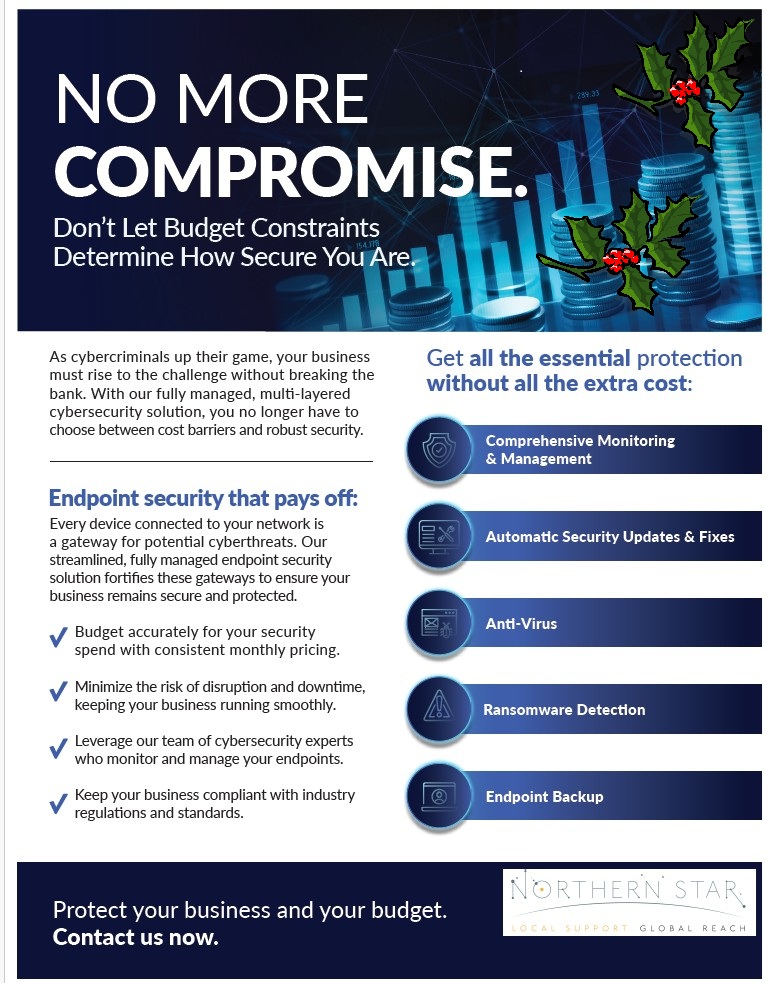
Endpoint Security That Pays Off
Why Endpoint Detection and Response Is Essential for Modern Businesses In today’s digital landscape, cyber threats are constantly evolving, targeting organisations of all sizes. Traditional security measures are no longer sufficient to protect sensitive data and business operations. This is where investing in an Endpoint Detection and Response (EDR) solution becomes crucial. EDR solutions are designed to detect sophisticated threats that may bypass conventional antivirus software. By monitoring endpoint activities in real time, EDR tools can quickly identify anomalous behaviour, helping organisations respond before any damage is done. One of the standout benefits of EDR is its ability to facilitate swift incident response. With advanced forensics and automated containment features, businesses can isolate affected devices and limit the spread of malicious software, reducing downtime and minimising potential losses. EDR platforms offer a centralised view of all endpoints within a network. This broad visibility makes it easier for IT teams to monitor device health, track security events, and spot vulnerabilities that might otherwise go unnoticed. Many industries require strict data protection standards. EDR solutions assist organisations in meeting compliance requirements by providing detailed audit trails and reporting capabilities, ensuring that businesses remain in line with regulatory frameworks. Investing in EDR can help reduce the long-term costs associated with data breaches and cyberattacks. By proactively defending against threats and automating routine security tasks, organisations can allocate resources more effectively and avoid costly remediation efforts. Contact one of our Security specialists on 08003196032 or email them at sales@northernstar.co.uk to find out more about our EDR solutions.
The Advantages of Microsoft 365 Copilot
Contact one of our Microsoft 365 Co-Pilot specialists on 08003196032 or email them at sales@northernstar.co.uk to find out more about our AI solutions.

Why EDR Matters More Than Ever
Cyber threats aren’t slowing down—they’re getting smarter. And let’s face it: traditional antivirus tools? They just don’t cut it anymore. That’s where Endpoint Detection and Response (EDR) steps in. So, what’s EDR all about? Think of EDR as your security team’s eyes and ears on every device—laptops, desktops, servers. It doesn’t just block threats; it watches, learns, and reacts. If something looks suspicious, EDR helps you jump in fast and stop the damage before it spreads. Here’s why businesses love EDR: Always Watching: Real-time monitoring so nothing slips through the cracks. Smarter Detection: Spots unusual patterns, not just known viruses. Quick Action: Isolate a compromised device before things get ugly. Deep Insights: Detailed logs for investigations and compliance. Why now? Remote work and cloud adoption have opened more doors for attackers. Endpoints are prime targets, and EDR gives you the visibility and speed you need to stay ahead. Bottom line: EDR isn’t a “nice-to-have” anymore—it’s essential. It combines detection, response, and investigation so you can protect what matters most. ✅ Ready to strengthen your security? Don’t wait for a breach to happen. Explore EDR solutions today and take control of your endpoint security. Start your journey now—your business depends on it. Contact one of our Security specialists on 08003196032 or email them at sales@northernstar.co.uk to find out more about our EDR solutions.

