
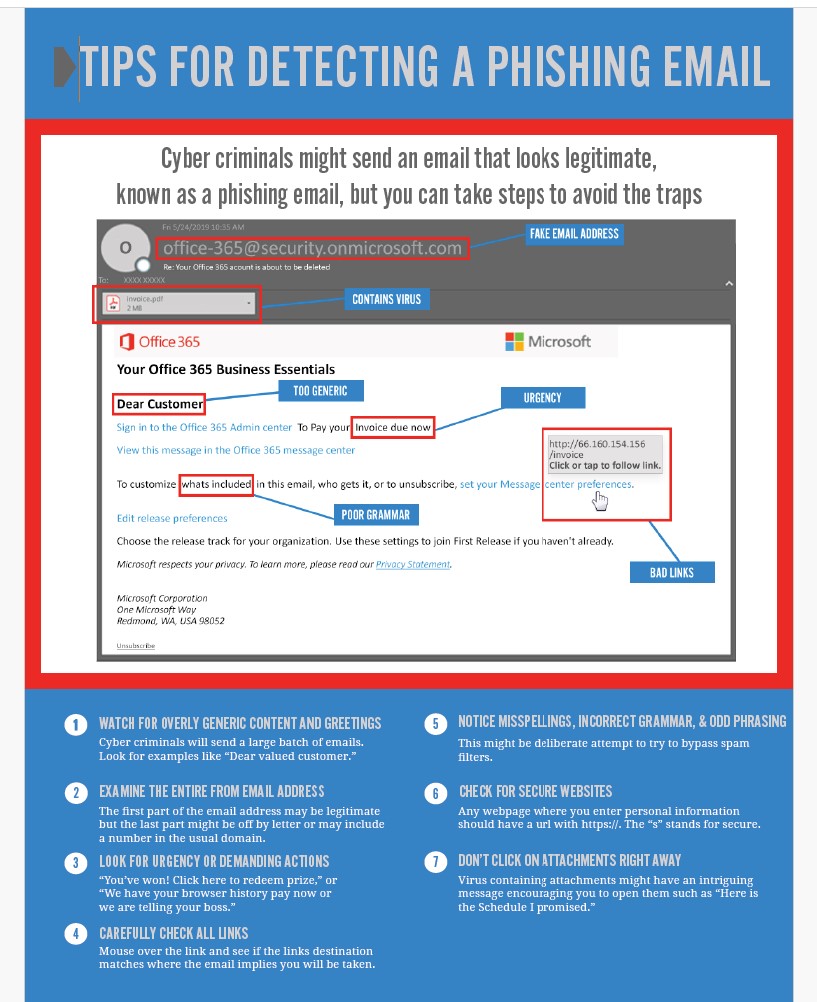
Phishing emails aim to trick you into giving up private information or clicking on harmful links. Here’s how to spot them quickly: Check the sender’s address: Scammers often use email addresses that look almost—but not quite—like real ones. Always double-check. Look for grammar and spelling mistakes: Legitimate organisations rarely send emails full of errors. Be cautious with urgent messages: If an email pressures you to act fast or threatens consequences, it could be a scam. Hover over links before clicking: If the destination looks odd, don’t click. Watch for generic greetings: “Dear Customer” instead of your name can be a sign of phishing. Never share sensitive info via email: Genuine companies won’t ask for passwords or bank details this way. If unsure, contact the company directly: Use contact details from their official website—not from the suspicious email. Trust your instincts. When in doubt, verify before you click or respond. Contact us now to out find out more about the services we offer that can help reduce the risk of a Phishing attach on your organisation Call us on 0800319 6032 or email us at sales@northernstar.co.uk
The Importance of Secure IT Defences Against Cyber Criminals
Cyber criminals do not only target large corporations with huge IT budgets. They also target small and medium-sized businesses because they know that many are busy, stretched and relying on systems that have grown over time rather than being properly planned. If your business depends on email, cloud platforms, online payments, customer data or remote working, cyber security is no longer something you can push to the bottom of the list. It sits right next to productivity, trust and business continuity. The UK Government’s Cyber Security Breaches Survey 2025/2026 found that 43% of UK businesses reported a cyber breach or attack in the previous 12 months. For medium-sized businesses, that rose to 65%, and for large businesses it reached 69%. That does not mean every incident becomes a disaster. Many are stopped early. Some are low impact. But the point is simple: cyber risk is now a normal business risk. A practical cyber security plan, backed by reliable IT support and management, helps you reduce that risk before it turns into downtime, lost data, reputational damage or unexpected costs. Why Cyber Criminals Target Everyday Businesses Most cyber attacks do not start with a dramatic “hack” like you see in films. They often begin with something ordinary. A staff member clicks a convincing email. A password is reused across several systems. An old laptop is still running unsupported software. A cloud account has weak access settings. A supplier’s email is compromised and used to send a fake invoice. These are the kinds of gaps cyber criminals look for because they are realistic and common. Phishing remains one of the biggest issues. The same UK Government survey found that phishing was experienced by 38% of businesses and was still the most common type of breach or attack. This is why user awareness and email protection matter just as much as technical tools. A good defence does not rely on one product doing everything. It combines people, processes and technology so your business is harder to attack and faster to recover. What Secure IT Defences Actually Include Secure IT defences are not just firewalls and antivirus software. Those things still matter, but modern businesses need a wider approach. Your defences should help you prevent attacks, detect suspicious activity, respond quickly and recover if something goes wrong. That may include: Strong passwords and multi-factor authentication Email filtering and phishing awareness Secure Microsoft 365 and cloud settings Endpoint protection for laptops and desktops Regular updates and patching Backups that are tested, not just assumed Access controls for staff and suppliers Monitoring for exposed credentials Clear incident response steps Ongoing review of your IT environment This is where professional security services can help. The aim is not to make security complicated. It is to make it practical, structured and suitable for the way your business actually works. Phishing Is Still One Of The Biggest Weak Points Your staff are often the first line of defence. That is not because they are the problem. It is because attackers know people are busy and emails can be made to look convincing. A phishing email might pretend to be from Microsoft, a bank, a delivery company, a senior manager or a trusted supplier. It may ask someone to enter login details, approve a payment or open an attachment. Good anti phishing support helps your team spot these risks without making them feel blamed or embarrassed. Realistic testing, simple training and better reporting habits can make a big difference. The goal is not to catch people out. The goal is to help them pause, question and report anything suspicious before damage is done. Exposed Passwords Can Become A Bigger Problem A leaked password may not seem serious at first, especially if it comes from an old account. But if that password has been reused, it can give attackers a way into business systems. This is why dark web monitoring can be useful. It helps identify whether business email addresses, passwords or company details have appeared in places linked to cybercrime. The value is not just the alert itself. It is what you do next. You may need to reset passwords, check account activity, review multi-factor authentication, update access rights or warn affected users. For many businesses, this early visibility can help stop a small exposure turning into account compromise. Your Network Needs Regular Testing Many businesses assume their network is safe because everything appears to be working. Unfortunately, systems can look fine while still carrying avoidable weaknesses. A network penetration testing review can show what an attacker might be able to reach if they tried to access your environment. It can highlight weak points, misconfigurations and risks that ordinary day-to-day support may not uncover. This does not need to be a scare exercise. A good test should give you clear priorities. Which issues matter most? What should be fixed first? What can be monitored? What is low risk? For more detailed technical reviews, Penetration Testing can help you understand where your strongest and weakest points really are. Cloud Security Cannot Be Left To Default Settings Many UK businesses now rely on Microsoft 365, cloud email, shared files and remote access. These tools are useful, but they need proper configuration. Poorly managed cloud systems can create risks around user permissions, external sharing, weak passwords and old accounts that should have been removed. With the right cloud services and Office 365 support, your business can improve access control, strengthen account security and make sure users have what they need without leaving unnecessary gaps open. Cloud security is not about locking everything down so tightly that staff cannot work. It is about giving people safe, reliable access to the right systems. Secure Hardware And Software Still Matter Cyber security is not only about specialist tools. It also depends on the basics. Old devices, unsupported software, poor routers and inconsistent licences can all create problems. If your team uses different tools in different ways, it becomes harder to manage updates, security settings and support. Reliable hardware and software support helps your business choose equipment and applications that fit

The Crucial Role of Dark Web Monitoring for Stolen Company Login Credentials
The Hidden Dangers The dark web is a shadowy marketplace for stolen company login credentials. Businesses face real risks, from financial loss to reputational harm, when credentials fall into criminal hands. Dark web monitoring has become a vital way for organisations to detect and act on these threats early. What Is Dark Web Monitoring? Dark web monitoring scans hidden sites and forums for stolen company information, alerting businesses if credentials or sensitive data have been compromised. Why Credentials Matter Enable business email compromise, data theft, and ransomware attacks Sold or exploited for credential stuffing and other schemes How Monitoring Helps Provides early warnings when credentials appear on the dark web Allows quick response—resetting passwords and investigating breaches Encourages better password habits and multi-factor authentication Taking Action Choose a reputable monitoring service Integrate alerts with your security team Audit passwords regularly and train staff In today’s digital landscape, dark web monitoring is vital for protecting your business. Identifying stolen credentials at the earliest opportunity allows companies to minimise potential damage and safeguard their operations and reputation. Northern Star provides an exceptional dark web monitoring solution that is both cost-effective and tailored to meet the needs of businesses in and around London. By partnering with us, you can ensure that your organisation remains secure and resilient against emerging threats. Don’t wait for an incident to happen—take proactive steps now! Reach out to our IT security specialists today at 0800 319 6032 or email us at sales@northernstar.co.uk.

Guardians of the Endpoint: The Crucial Role of EDR in Modern IT Security
EDR is a cybersecurity technology that monitors and responds to threats on endpoints like computers and servers. Unlike traditional antivirus solutions, EDR continuously monitors endpoint activities, detects anomalies, and responds to potential threats in real-time. Key Benefits of EDR Real-Time Threat Detection: EDR provides real-time visibility into endpoint activities, allowing security teams to detect and respond to threats as they occur. Comprehensive Visibility: EDR tools offer a complete view of the network of endpoints, enabling security teams to monitor and analyse behaviours. Rapid Incident Response: EDR automates incident response processes, isolating compromised endpoints and initiating remediation actions quickly. Advanced Threat Hunting: EDR uses behavioural analytics and machine learning to identify and investigate sophisticated threats. Enhanced Forensics and Reporting: EDR provides detailed forensic data and reporting capabilities, aiding in compliance and understanding attack vectors. EDR is crucial in modern IT security for several reasons: Proactive Defence: EDR continuously monitors endpoints and detects threats in real-time, preventing security incidents before they escalate. Mitigating Advanced Threats: EDR detects and responds to advanced threats like zero-day attacks and ransomware. Reducing Dwell Time: EDR reduces the duration a threat remains undetected within the network. Supporting Incident Response: EDR streamlines and automates incident response processes, ensuring swift and effective responses. Endpoint Detection and Response (EDR) offers several key benefits that significantly enhance IT security. It provides real-time threat detection and comprehensive visibility into endpoint activities, allowing security teams to monitor and respond to threats as they occur. EDR also automates incident response processes, quickly isolating compromised endpoints and initiating remediation actions. Additionally, EDR empowers security teams with advanced threat hunting capabilities, using behavioural analytics and machine learning to identify sophisticated threats. At Northern Star, we empower businesses throughout the London area and beyond by seamlessly integrating a cost-effective and robust Endpoint Detection and Response (EDR) solution into their existing IT infrastructure. This addition significantly enhances your overall IT security, allowing you to focus on what you do best—growing your business. Cyber data theft is an ever-present threat, and our comprehensive suite of security products is designed to safeguard your organisation against these risks. If you’re new to EDR or looking to elevate your current security software stack, our team is ready to partner with you in crafting a strategic IT security roadmap tailored to your needs. Don’t leave your business vulnerable. Reach out to us today by calling 0800 319 6032 or emailing sales@northernstar.co.uk to discover how we can bolster your security measures.

The Hidden Costs of Reactive IT: Why a Proactive Approach Is Worth the Investment
Think about the last time an unexpected IT issue disrupted your business operations. Maybe it was a cyberattack, a server crash, or a slow network that affected your daily activities. How much valuable time did you lose? How much frustration did it cause for you and your customers? This is the cost of reactive IT: unplanned downtime, lost revenue, and unnecessary frustration. In this blog, we’ll explore how reactive IT impacts your business and explain the benefits of adopting a proactive IT approach to build a resilient, future-ready business. The Real Cost of Reactive IT Let’s dive into what reactive IT looks like and how it affects your business operationally and financially: Issue Resolution: Reactive IT means your team is always in fire-fighting mode, constantly responding to emergencies and unplanned outages. This leaves no time for strategic initiatives, as resources are spent dealing with roadblocks. Cost: Lost productivity. Short-term Solutions: Quick fixes to IT problems are like patching a crack in the ceiling without addressing the root cause. This leads to fragmented and inefficient technology management. Cost: Increased inefficiencies. Security Vulnerabilities: A reactive approach means implementing security measures only after an incident occurs, increasing the risk of cyberattacks and leaving your business vulnerable to hackers. Cost: Your business is perpetually at risk. Why Proactive IT is Good for Business Now, let’s discuss the key aspects of a proactive IT approach and how it benefits your business: Prevention Focus: The primary goal of proactive IT is to prevent problems like system crashes, data loss, and security breaches by identifying and mitigating potential vulnerabilities. This includes regular risk assessments and robust security measures. Benefit: Saves money. Continuous Monitoring: Proactive IT relies on constant monitoring of system health, performance, and security. This allows for early detection of potential issues before they escalate into major problems. Benefit: Keeps systems updated. Predictive Analytics: Using data and analytics to forecast potential issues and take preventative measures is crucial. This helps anticipate bottlenecks and optimize IT infrastructure for peak performance. Benefit: Improves efficiency. Regular Updates and Patching: Keeping software up to date is essential for patching security vulnerabilities and ensuring optimal performance. A proactive approach ensures systematic software updates and patching, reducing the risk of cyberattacks. Benefit: Stronger security. Say No to IT Headaches. Embrace Proactive IT. If you’ve been stuck in a cycle of constantly reacting to IT issues without ever feeling in control, we’re here to help. You don’t have to shoulder the burden alone. Instead, rely on an experienced IT partner like us to do the heavy lifting. Our team will work with you to create a proactive IT strategy tailored to your needs and budget. We’ll guide you through the process, answer all your questions, and ensure a smooth transition. Sound good? Don’t delay, get in contact now by either speaking with one of our IT experts on 0800 319 6032 or emailing us at sales@northernstar.co.uk

Unlocking the Power of Outsourced IT Support
In today’s dynamic business landscape, companies of all sizes are increasingly turning to outsourced IT support to maintain a competitive edge and enhance efficiency. Outsourcing IT support offers a multitude of advantages that can help businesses streamline their operations, reduce costs, and focus on their core activities. Let’s explore the key benefits of outsourcing IT support: Cost Savings and Predictable Expenses Imagine transforming your IT expenses from unpredictable to predictable. Outsourcing IT support allows businesses to pay only for the services they need, shifting from fixed payroll costs to a predictable monthly fee. This financial predictability helps companies allocate their budgets more efficiently and reduces the burden of upgrading hardware, software, and security measures. Access to Specialised Expertise Technology is constantly evolving, and keeping an internal IT team trained on the latest advancements can be challenging and costly. Outsourcing IT support grants businesses access to experienced professionals with expertise in various areas such as cybersecurity, cloud computing, and data management. These specialists stay current with industry trends and best practices, ensuring businesses receive high-quality support. Scalability and Flexibility Business needs fluctuate, and IT requirements must adapt accordingly. Whether a company is expanding, integrating new technology, or managing seasonal demands, outsourced IT support provides the flexibility to scale services up or down as needed. Unlike in-house teams that require hiring, training, and restructuring, an IT provider can quickly adjust resources to match evolving demands. This scalability is particularly valuable for businesses experiencing rapid growth, enabling them to stay competitive, innovate more efficiently, and respond to market changes with confidence. Enhanced Security and Compliance Outsourced IT providers often have specialised knowledge and tools to enhance a company’s security posture. They can implement robust security measures, conduct regular security audits, and ensure compliance with industry regulations. This proactive approach helps protect businesses from cyber threats and data breaches, which can be costly and damaging to a company’s reputation. Focus on Core Business Activities By outsourcing IT support, businesses can free up internal resources and focus on their core activities. This allows employees to concentrate on their primary roles without being distracted by IT issues. With a reliable IT partner handling the technical aspects, companies can improve productivity and efficiency, ultimately driving growth and success. Access to the Latest Technology Outsourced IT providers typically bundle their services with the latest technology solutions, ensuring businesses stay ahead without large capital expenditures. This access to cutting-edge technology allows companies to leverage advanced tools and systems that might otherwise be out of reach, providing a competitive edge in the market. Northern Star stands as a leading Managed Service Provider (MSP) in London and beyond, with over 20 years of dedicated experience in delivering innovative and cost-effective IT solutions tailored specifically for the SME sector. We have empowered numerous companies to transition from handling IT support in-house to partnering with a reliable global MSP that understands your unique IT needs and budget. Our extensive range of IT solutions includes cutting-edge cloud-based security and advanced endpoint detection and response. If you’re curious about penetration testing and want guidance on how to proceed, we are here to support you. We’ve successfully assisted many businesses in conducting cost-effective penetration tests, whether as a one-time evaluation or through ongoing assessments throughout the year. It’s crucial to note that cyber insurance providers are increasingly requiring businesses to perform these tests at least one or two times annually. By including penetration testing in your IT budget, you can not only enhance your security posture but also potentially save on insurance costs. Don’t wait any longer to safeguard your business. Get in touch with us today to learn more.Call one of our security specialists on 0800 319 6032 or email us at sales@northernstar.co.uk.
Password Best Practices
10 Password Best Practices In today’s digital age, technology is an integral part of any business. While it offers numerous advantages, it also brings challenges, particularly in cybersecurity. One of the most fundamental aspects of cybersecurity is password protection. This involves setting passwords to secure data, ensuring that only those with the correct passwords can access the information. However, the frequent use of passwords often leads to complacency and careless mistakes, which can result in security breaches. Therefore, businesses must educate their employees on best practices for using passwords. 5 Password “Don’ts” To protect the confidentiality of your passwords, avoid these five common mistakes: Don’t write passwords on sticky notes. While it might seem like a good way to remember your passwords, it makes them vulnerable to local theft. Don’t save passwords to your browser. Browsers are not secure for storing sensitive information, as they can be easily compromised by malware and other threats. Don’t iterate your password (e.g., PowerWalker1 to PowerWalker2). This practice is ineffective against sophisticated cyber threats, as hackers can easily crack iterated passwords. Don’t capitalize the first letter of your password to meet the “one capitalized letter” requirement. Hackers are aware of this common habit, making it easy for them to guess the capitalized letter’s position. Don’t use “!” to meet the symbol requirement. If you must use it, avoid placing it at the end of your password. Instead, place it elsewhere in the sequence to enhance security. 5 Password “Do’s” To ensure the confidentiality of your passwords, follow these five best practices: Create long, phrase-based passwords that substitute letters with numbers and symbols. For example, “Honey, I shrunk the kids” can be written as “h0ney1$hrunkth3k!d$,” making it harder for hackers to crack. Use multifactor authentication. Adding multiple layers of authentication is one of the best ways to keep cybercriminals at bay. Always use passwords longer than eight characters that include numbers, letters, and symbols. The more complex the password, the better. Use a different password for every account. Reusing passwords across multiple accounts gives cybercriminals a golden opportunity to exploit all your accounts. Use a password manager. This tool can help you remember a long list of passwords, freeing up your time for more productive tasks. Adhering to password best practices requires ongoing attention and effort. Working with a managed service provider (MSP) such as Northern Star can help improve security. Northern Star has more than 20 years of IT experience in educating businesses and employees about best IT security practices for protecting against cyber theft of company data. We offer various IT security solutions and can be customized for different business needs. For further information or to arrange a consultation, please call 0800 319 6032 or email sales@northernstar.co.uk.

Windows 10 End of Life: What You Need to Know
Windows 10, released in 2015, has been a reliable operating system for nearly a decade. However, Microsoft will end support for Windows 10 on October 14, 2025, bringing important changes for users. End of life means Microsoft will stop providing updates, security patches, and technical support for Windows 10. Devices will still run, but without protection from new vulnerabilities. Microsoft regularly phases out older systems to focus on newer technology, like Windows 11, offering improved security and performance. As Windows 10 approaches its end-of-life, many organisations are faced with important decisions regarding their IT infrastructure. Northern Star has successfully assisted numerous businesses in transitioning smoothly to Windows 11, drawing on a wealth of IT security expertise accumulated over nearly two decades. The conclusion of Windows 10 support means that continuing to use this operating system will increasingly expose your systems to security threats and operational risks. Cybercriminals often target unsupported platforms, as unpatched vulnerabilities can leave networks wide open to exploitation. With this in mind, it is crucial to develop a comprehensive plan to upgrade or replace any devices still running Windows 10 well before support officially ends. To ensure your business remains protected, consider conducting a full assessment of your current devices and determining which ones can be upgraded to Windows 11 and which will require replacement. Early planning allows ample time for testing, user training, and seamless migration of critical data and applications, minimising disruption to your daily operations. Upgrading before the October 14, 2025, deadline will help safeguard your business against emerging digital threats and ensure business continuity. If you require guidance or support in navigating this transition, Northern Star is ready to provide expert advice and tailor solutions to your unique needs. Don’t wait until the last moment—secure your network, maintain compliance, and future-proof your IT systems. For further information or to arrange a consultation, please contact us at 0800 319 6032 or sales@northernstar.co.uk.
Employee Credentials on the Dark Web: A Serious Business Threat-Safeguard Your Organisation Now!
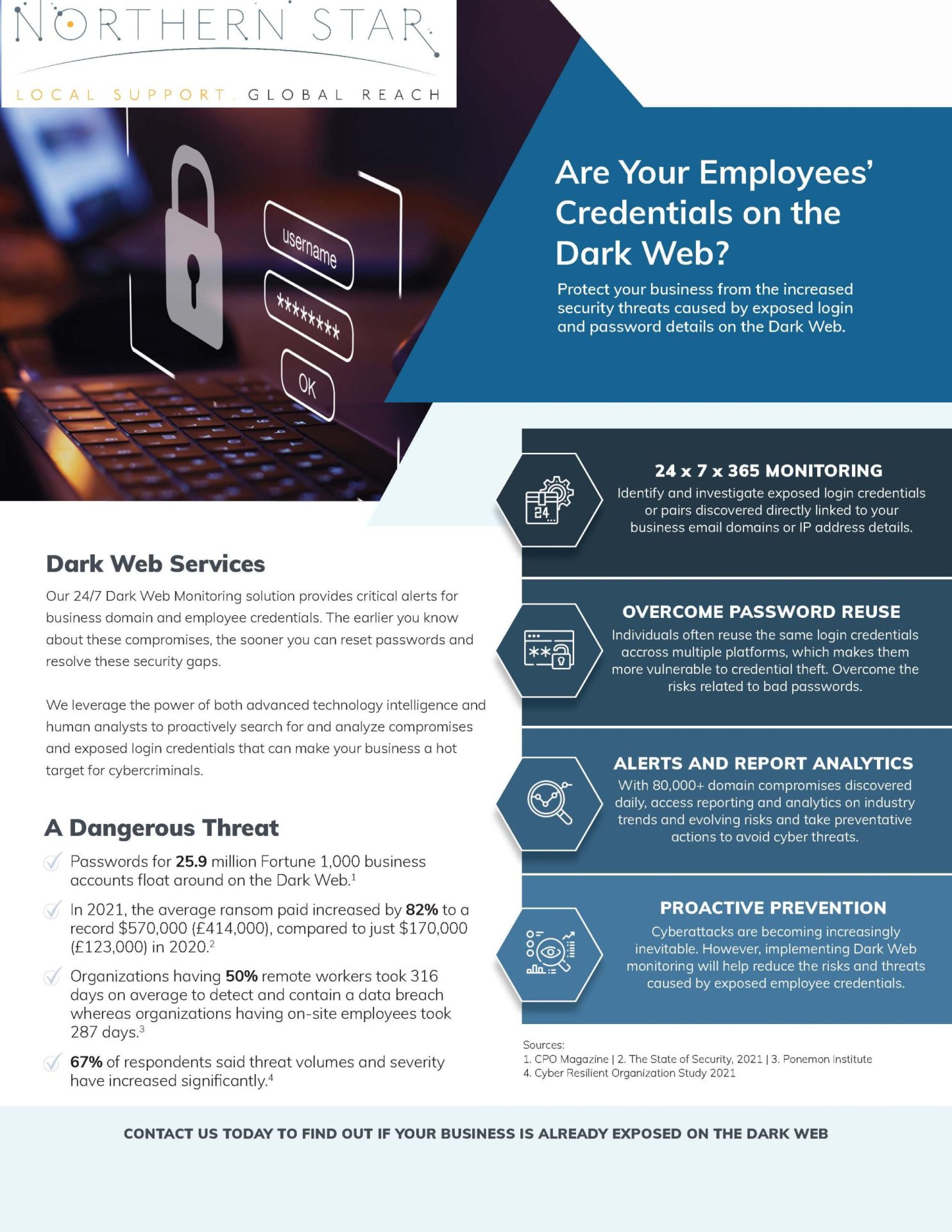
Employee credentials are one of the easiest ways for cyber criminals to get inside a business. A username and password may seem like a small detail, but if those details are exposed, they can give an attacker a route into your email, cloud files, finance systems, client data and internal conversations. This is why employee credentials on the dark web should never be ignored. If your staff logins are being shared, sold or tested by criminals, your organisation may already be at risk before anyone notices anything unusual. With the right monitoring, user awareness, account protection and ongoing IT support and management, you can identify risks earlier and take practical steps before exposed credentials become a serious business incident. Why employee credentials end up on the dark web Employee credentials can be exposed in several ways. A member of staff may click a phishing link and enter their password into a fake login page. Malware may steal saved passwords from a laptop or browser. Details may also be leaked through a third-party website or service that has suffered a data breach. The risk becomes much greater when employees reuse passwords across work and personal accounts. A password leaked from a personal website may later be tested against Microsoft 365, remote access tools, accounting software or other business systems. This is known as credential stuffing, and it is one reason password reuse is so dangerous. Your business does not need to suffer a direct breach for your credentials to appear online. That is what makes dark web monitoring so valuable. It can help identify exposed business email addresses, compromised passwords and company-related data that may already be circulating in places linked to cybercrime. Why this is a serious business threat If an attacker has valid login details, they may not need to break through your systems. They may simply sign in. From there, they could read emails, access files, reset passwords, impersonate employees, redirect payments or send convincing phishing messages from a genuine business account. If the account belongs to a senior employee or administrator, the risk can be even more serious because that account may have wider access. Compromised credentials can lead to: Unauthorised access to business systems Fraudulent emails sent from real company accounts Invoice fraud and payment redirection Data loss or data theft Ransomware risk Loss of client confidence Regulatory and legal concerns For small and medium-sized businesses, the impact can be particularly difficult. You may not have a large internal cyber security team, but criminals still see your data, accounts and systems as valuable. Practical security services should therefore be part of your wider IT plan, not something you only consider after an incident. Phishing remains one of the biggest risks Phishing continues to be one of the most common ways attackers target UK organisations. Fraudulent emails, fake login pages and convincing messages can trick employees into giving away their details without realising it. This is why your people need to know what suspicious messages look like. They should be encouraged to question unexpected links, urgent requests, password expiry warnings and login prompts that do not feel right. A structured anti phishing approach can help your team recognise common tactics and report concerns quickly. This should not be about blaming employees. It should be about helping them become a stronger part of your defence. Strengthen your Microsoft 365 and cloud accounts Many businesses rely on Microsoft 365 for email, file storage, calendars, collaboration and day-to-day communication. That makes cloud accounts a major target for credential-based attacks. Your cloud services and Office 365 setup should be reviewed regularly. Multi-factor authentication should be enabled where possible, old accounts should be removed, permissions should be appropriate and unusual sign-in activity should be investigated. Admin accounts need extra care. If an attacker gains access to an administrator account, they may be able to make wider changes across your environment. Admin rights should only be given to people who genuinely need them, and those accounts should have stronger protection than standard user accounts. Use multi-factor authentication wherever possible Multi-factor authentication adds an extra step when someone signs in. This means that even if a password is exposed, an attacker may still be blocked from accessing the account. It is especially important for email, cloud platforms, finance systems, remote access tools and administrator accounts. While no single control removes all risk, multi-factor authentication is one of the most practical ways to reduce the damage caused by leaked passwords. You should also review how authentication is managed across your business. If some systems have strong protection but others do not, attackers may target the weakest entry point. Protect every device your staff use Credentials are often stolen from devices, not just websites. If a laptop, desktop or mobile device is infected with malware, saved passwords, browser sessions and business data may be at risk. Every work device should be updated, protected and monitored. Staff should avoid saving passwords in unsafe places, and personal devices should not be used for sensitive business work unless they are properly managed. Reliable hardware and software support can help keep your devices secure, maintained and suitable for the way your team works. It can also make it easier to respond quickly if a device is suspected of being compromised. Review your wider security position Credential exposure can be a sign of wider security weaknesses. Old software, weak passwords, poor access controls, unprotected devices and exposed remote access services can all increase the chance of an account being misused. Regular technical reviews can help you find these weaknesses before attackers do. Network penetration testing can help identify vulnerabilities across your IT environment, while broader penetration testing can show how your systems may stand up against real-world attack methods. The aim is not to create fear. It is to give you useful information, clear priorities and practical actions that reduce risk. Plan properly when systems change Credential risk can increase during periods of change. If you are moving platforms, introducing new cloud tools, merging systems or changing providers, old accounts and weak access controls can

A Day in the Life of an IT Support Engineer
In the rapidly evolving landscape of technology, IT support engineers play a crucial role in ensuring the seamless operation of systems and services. Their daily responsibilities encompass the troubleshooting of technical issues, the provision of guidance on software and hardware, and the maintenance of a stable digital environment. The following overview illustrates the typical duties and activities of an IT support engineer throughout the day. Morning: Setting the Stage The day commences early for an IT support engineer, who begins by reviewing emails and assessing any support tickets that have been submitted overnight. This initial phase is essential for prioritising tasks and strategically planning the day. Following this, a concise team meeting often takes place, during which engineers discuss ongoing technical challenges, share valuable insights, and assign responsibilities to optimise the workflow. Mid-Morning: Addressing Technical Challenges With a strategic plan established, IT support engineers engage in troubleshooting a variety of technical issues. These challenges may involve resolving network connectivity problems or addressing software malfunctions. Each issue presents its complexities, necessitating a combination of technical expertise and analytical skills. Engineers frequently utilise remote access tools to diagnose and resolve problems efficiently, often without requiring physical presence at the user’s location. Lunchtime: A Moment for Rejuvenation The lunchtime period offers a vital opportunity for a brief respite from the continuous stream of technical challenges. This time allows engineers to recharge, interact with colleagues, and perhaps exchange light-hearted conversations related to technology. However, this intermission is typically short-lived, as the afternoon presents its own set of challenges that require immediate attention. Afternoon: User Support and Training The afternoon is primarily dedicated to user support and the facilitation of training sessions. IT support engineers provide assistance to employees experiencing technical difficulties, which may include the setup of new hardware or instructions on specific software applications. These training sessions are instrumental in equipping users with best practices and familiarising them with emerging technologies. Late Afternoon: Documentation and Reporting As the workday concludes, IT support engineers focus on comprehensive documentation and reporting. It is imperative to maintain detailed records of issues and their resolutions for future reference and continuous improvement. Additionally, engineers prepare reports summarising the day’s activities, highlighting recurring challenges and recommending potential solutions. Evening: Concluding the Day Before finishing their duties for the day, IT support engineers systematically review any outstanding support tickets to ensure that critical issues have been addressed appropriately. They may also allocate time for researching new technologies and remaining informed about industry trends. Continuous professional development is not merely an asset but a fundamental aspect of the role, given the ever-evolving nature of the technology sector. Northern Star has a small, globally distributed team of engineers dedicated to providing our clients with exceptional technical support and guidance in all aspects of IT. One advantage of having a smaller team is the personal approach we can offer. Clients will work with the same group of engineers consistently, fostering trust and building strong working relationships. There’s nothing more frustrating than logging a ticket with your IT helpdesk and having it passed around among multiple engineers without clear ownership of the issue. That’s why we ensure you work with the same dedicated engineer throughout the entire process of resolving your IT query. Should the need arise to escalate your issue to our second or third-line support teams, you will still have a single point of contact. Our engineers boast a wealth of expertise, each with a minimum of five years of IT experience, so you can trust that you are in highly capable hands. Unlock the power of our professional and cost-effective IT solutions, expertly crafted to meet your specific needs and size. Don’t wait—contact us today on 0800319 6032 or email us at sales@northernstar.co.uk to elevate your IT experience!

